


A “small studio look” used to mean a camera body, a couple of lights, and a table that slowly became a permanent set in someone’s apartment. In 2026, a phone can get surprisingly close, as long as the shoot is treated like a tiny production instead of a quick clip. The difference rarely comes from the newest phone model. Light control, constant framing, clean audio when it’s needed, and an edit that looks like it was done on purpose are what make it work.
Visit Clideo as part of a useful process is helpful, especially when clips need to be trimmed, resized, and given a quick polish before they go live. Some “last mile” jobs that keep the process going are cutting, merging, compressing, and exporting for different platforms. These can be done on the web. The goal is speed with consistency, so the video keeps its studio vibe from capture to upload.

Build a phone studio that fits in a shoebox
A small studio look starts with a set that behaves the same way every time. The easiest way to get that is to create a repeatable “micro-space” rather than constantly changing locations.
Pick one surface and one background that can stay assembled. A matte poster board, a neutral fabric, or a wooden board with texture can look high-end with clean lighting. Glossy backgrounds cause reflections that quickly look sloppy. If reflective products are involved, a soft gradient background often looks more expensive than a pure white wall.
Minimize and separate the parts of the setting. A studio is mostly a system for controlling variables.
- Surface and backdrop: matte, neutral, and large enough to avoid edge lines in frame
- Light source: one soft key light near a window or a small LED with diffusion
- The baking paper: a thin white sheet, or a cheap diffuser can be used for diffusion and bounce. For fill, a white foam board can be used.
- Stability: a small frame or clamp works well, but in a pinch, a stack of books will do.
- Consistency cue: tape marks for where the product and tripod should sit
This “shoebox studio” matters because product video is repetitive by nature: multiple angles, small changes, same framing. Consistency is what makes a phone clip feel like it came from a controlled studio.
For a deeper breakdown of creating a reliable product setup with simple gear, Shopify’s 2026 guide on DIY product visuals is a strong reference point.
Lighting that makes cheap products look expensive
Lighting is the main separator between “quick phone video” and “small studio.” Expensive-looking product video usually has soft highlights, gentle shadows, and no flicker.
Start with one key light. A north-facing window is often the simplest. Put the product close to the window, then diffuse the light so it wraps. Harsh light creates sharp shadow edges that scream “kitchen table.” Diffusion turns that into a soft falloff.
When using LEDs, avoid mixing different color temperatures. If the room has warm bulbs and the LED is cool, the product will drift between orange and blue across clips. Lock the environment: turn off overhead lights, then commit to one light source. If the LED has brightness steps, keep it stable. If it has a “softbox” attachment, use it.
A studio look also depends on shadow shaping. A white bounce board on the dark side lifts shadows without flattening everything. A black card on one side adds contrast and makes edges look crisp. That “controlled contrast” is one of the easiest ways to give clideo-ready footage a premium feel before editing even starts.
One more detail that quietly matters: flicker. Some LEDs will flicker at a certain speed of the shutter. If the picture flickers, either slow down the camera speed or let natural light in. If there is a flicker, even if the arrangement is perfect, the whole thing will look bad.
For general, practical guidance on lighting and creating better short-form videos, Adobe’s recent post is useful context.
Camera settings that keep the phone from sabotaging the shot
Phones are designed to help, and they “help” hardest when the scene changes. Product video is all about keeping the scene stable. It is important to stop the camera from constantly recalculating color, focus, and brightness.
Lock exposure and focus whenever possible. Most phones allow tap-and-hold to lock focus. Do that on the product label or the most important detail. Then adjust exposure slightly down so highlights do not blow out. Bright reflections on packaging are hard to recover later.
Use the rear camera. The front-facing camera may be adequate for talking head videos, but product information is better captured with the improved lenses and sensors on the back. When you don’t need to worry about storage, use your phone’s 4K quality, especially for close-ups that need to be cropped. Most of the time, 1080p is enough for short movies, like Reels and TikTok videos.
Take care of the glass. Fingerprints create hazy highlights that look like cheap filters. A quick wipe before each batch of shots removes a surprising amount of “why does this look off.”
Audio matters less for pure product-only clips, but if hands are demonstrating a mechanism, the little clicks and texture sounds can add quality. If audio is needed, record it consistently. A tiny lav mic can make even a simple demonstration feel more “studio,” because the sound matches the crisp visuals.
This is also where a practical editing pipeline helps. Footage that has stable exposure, stable color, and stable focus is easier to trim and polish. Clideo becomes a convenience layer instead of a rescue mission.
Movement and angles that look like a real set

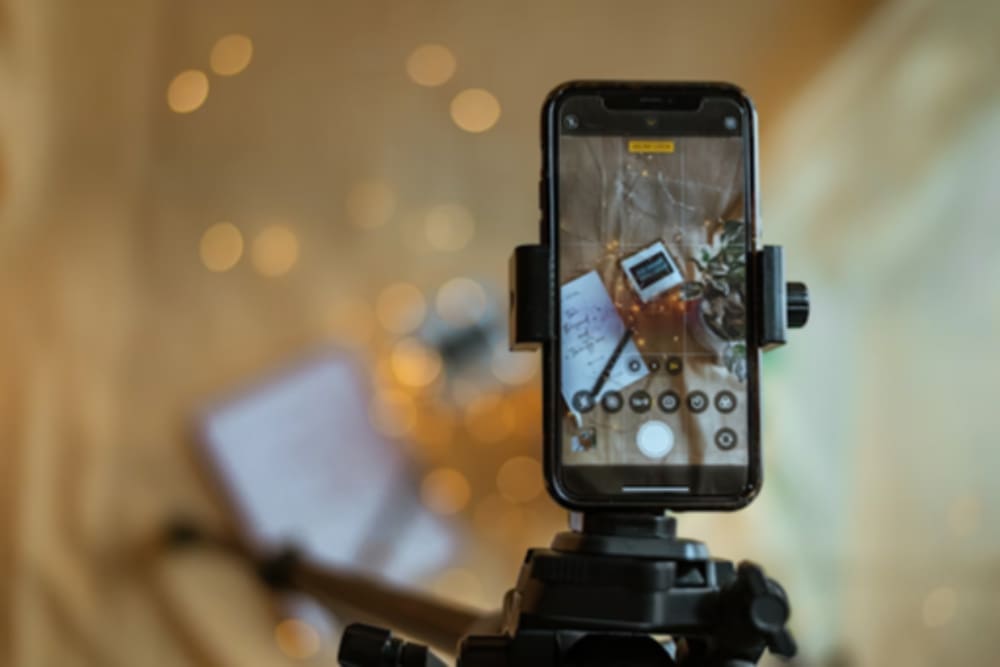
Studio product video rarely moves randomly. It moves with purpose: slow pans, controlled push-ins, and clean transitions between angles. On a phone, the same result is possible with simple rules.
First rule: move the product or the camera, not both at the same time. When both move, the clip looks chaotic. When one element moves, the motion feels designed.
Second rule: keep motion slow. A small push-in becomes dramatic quickly at close distances. Slow movement gives the viewer time to read texture, shape, and details.
Third rule: shoot in a “coverage pattern.” This is how professional product shoots stay efficient. Instead of improvising angles, capture a repeatable set:
- Hero angle at eye level
- Top-down shot for layout and packaging
- Detail close-ups of materials, buttons, seams, edges
- Use case angle showing scale in hand or on a desk
- One “satisfying” motion shot like opening, pouring, clicking, unfolding
Transitions become easier when footage follows a system. It also lessens the urge to over-edit. A studio look often feels calm and deliberate because it was planned at capture.
If there is a need for handheld movement, a strap tension trick can be employed: a strap is looped around the wrist, pulled slightly taut, and allowed to settle micro-shakes. A mini tripod as a handle is also helpful. For ultra-clean movement, a cheap phone gimbal can work, but it is optional. Lighting and stability usually beat fancy motion.
Editing that keeps the studio illusion intact
Editing is where phone footage either becomes “polished studio” or “social clip.” The difference is rhythm and restraint.
A studio-looking product video usually has:
- consistent white balance across clips
- matched exposure so cuts feel seamless
- clean timing, with no dead moments
- gentle sharpening and contrast control
- captions used sparingly, when they add clarity
Avoid overusing trendy effects. A product video can look premium with straightforward cuts and a clean soundtrack. Text overlays should feel like labels in a catalog: clear, minimal, aligned.
This is also where web-based workflows can make sense. When a video needs to be trimmed, resized for vertical, compressed for upload, and exported in a predictable format, clideo-style tools reduce friction. The best “editor” is often the one that keeps the workflow moving, so content stays consistent week to week.
In the final paragraph, the same principle can be applied to mobile editing if the task must be done on the phone itself. A fast way is to keep the capture clean and finish the polish with a specialized app mid-project, such as through the App Store listing at https://apps.apple.com/us/app/clideo-video-editor/id1552262611 when an on-device export and social-ready formatting are required without escalating the project to a full desktop-level project.
The “small studio” look is less about pretending a phone is a cinema camera and more about treating the phone like a controllable tool. A repeatable set, soft light, locked focus, slow movement, and clean edits create a premium result that holds up across platforms.


