


In today’s digital world, data loss is a major concern for users of both personal and work systems.
Accidental deletion, corruption, drive failure, or any other reason – can be a major setback for its users. Losing personal data can mean not being able to see our most cherished and memorable photos, videos, movies, or play our favorite music files, and losing professional or work data results in disrupting workflow, loss of productivity, consuming a lot of time, and, in some cases, putting a dent in our pockets (data recovery can be quite expensive).
This is where data recovery tools play a crucial role. They address the challenges of recovering data in its original state without tampering or harming it. However, with myriad options available to users, choosing the right one can significantly impact the success of data recovery efforts.
One tool that stands out is the Rikvr Data Recovery Tool.
Overview of Rikvr Data Recovery Software
Rikvr Data Recovery Software, as mentioned earlier, is the newest data recovery application available.
Too many articles and reviews have been written on some of the well-known tools, such as EaseUS Data Recovery Wizard, Wondershare’s Recoverit, DiskDrill by Cleverfiles, Remo Software’s Remo Recover, Stellar Data Recovery Software, and many more.
On the other hand, tools like Rikvr are practically unheard of. This time, I decided to review the Rikvr Data Recovery Software, and here’s my experience with the tool.
Table of Contents:
- Download and Setup Process
- The Test
- How to Use the Tool?
- The Results
- Things I Didn’t Like About the Tool
- The Good Part about the Tool
Downloading and Setup Process
Users must first download the Rikvr Data Recovery Software on their Windows or Mac systems.
- Click on the Download Link. The download setup file for Windows (.exe) and Mac (.zip) will be downloaded on your system.
- Navigate to the Download folder, and double-click on the exe or zip file.
- Rikvr will ask you for permission to download the tool.
- Once the downloading process is complete, you must set up Rikvr Data Recovery Software on your system.
- A Setup window will appear on your screen. Click on the Next button.
- Read the License Agreement and click the “I Accept” button.
The Rikvr Data Recovery Software installation begins; click the Finish button once the setup is complete.
The Test
Once the tool was installed on my system, I tested it in three different scenarios: deleted data, formatted data, and data residing in corrupted drives.
I began the test with the simplest scenario: deleting some files and folders from my system.
My next test was trying to recover data from a formatted drive. As most of you know, formatting erases data; in such cases, one can either use backups and restore files, or if you want to recover the formatted data, you need advanced data recovery tools.
I intentionally corrupted the drive in the last test to see if the software worked.
How to Use Rikvr Data Recovery Software to Recover Lost Files or Deleted Data?
The process is fairly simple. Once the tool is installed and on the user’s system, you can start the PC data recovery process.
- Launch the Software: Launch the Rikvr Data Recovery Software on your computer or laptop.
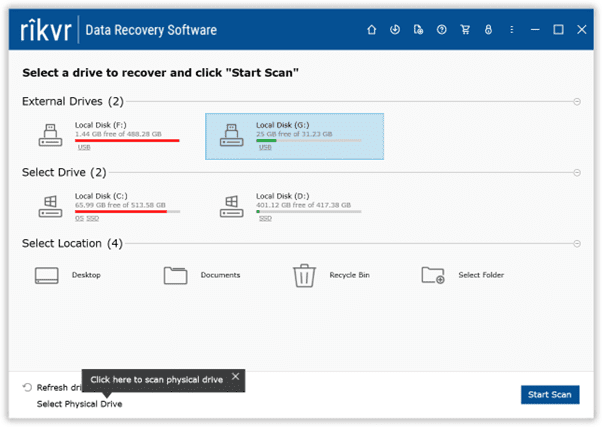
- View Folders and Display All Drives: The software displayed a list of all internal drives and folders available for file recovery, along with any connected external devices.
Rikvr also has options like “Refresh Drives,” which quickly refreshes and displays drives, and “Select Physical Drive,” which displays all the connected drives, including the corrupt and formatted drives.

- Select the Drive: Users must choose the drive or the folder from which they want to recover data and click the “Start Scan” button.
- Initiate Scanning: The tool will begin scanning the drive. After completing the Quick Scan, a deep scan will ensure a thorough recovery.
- Search, Sort, and Filter the Recovered Data: Now, no more waiting till the completion of the scanning process. As and when the scan progresses, Rikvr will simultaneously display the recovered data in a dynamic tree view.
- Previewing and Saving the Data: One of the best features of the Rikvr software is that it allows users to preview and save the data even when the scan is in progress. This option is helpful, especially when you want to recover a specific file or file without recovering any additional data.
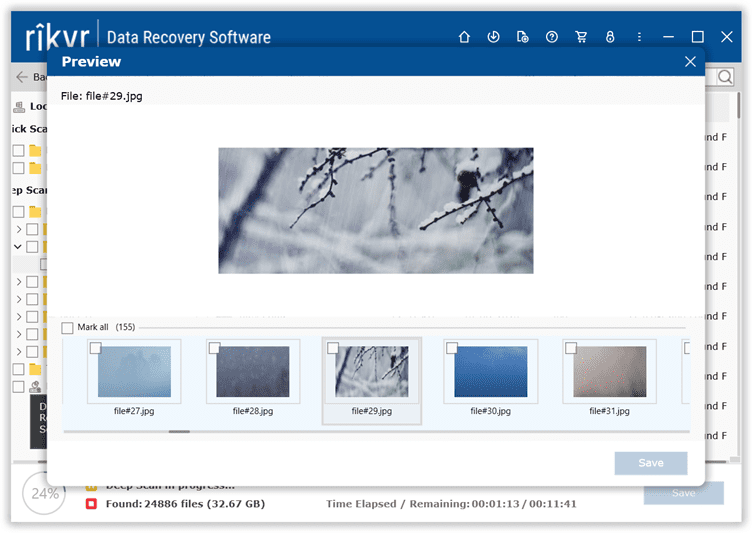 You can also wait till the completion of the entire drive scan. Then, preview the recovered data to verify the recovery process and the efficiency of the Rikvr software.
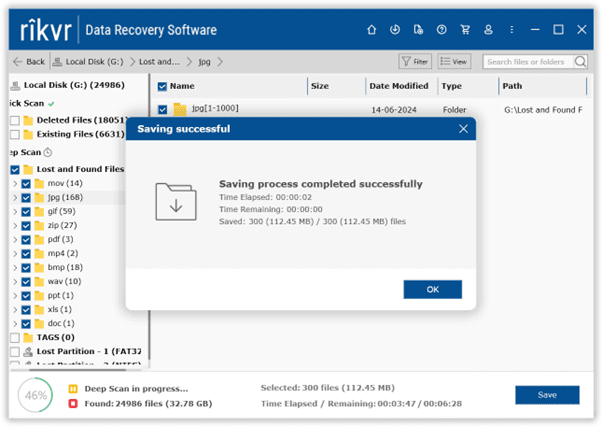
- Select and Save Data: Once satisfied with the recovery, select the recovered data and save it to a location of your choice.
- Complete the Process: Rikvr will start saving the recovered data. After completing the process, navigate to the selected location to verify the recovered data from the corrupted drive.
The Results:
Rikvr was able to recover all of my deleted data. In the case of formatted drive recovery, Rikvr not only recovered the saved data but also the data that was lost long ago.
In case of drive corruption, even though Rikvr fully recovered all of my important files and data, I also needed to verify whether the files were intact or corrupted.
Fortunately, in my case, all of my files were intact. But if your files have gotten corrupted, use file repair tools to repair your corrupt files and data. Regarding the corrupt storage device, I formatted my drive after ensuring all my data was recovered.
My Experience with Rikvr Data Recovery Software
Like any other product or tool, Rikvr has advantages and disadvantages. Here are some things I didn’t like about the software and wish Rikvr would work on them, as well as the features and options I liked.
Things I Didn’t Like About the Tool
- Deletion of data of any size is difficult to recover once the TRIM has been executed. Rikvr will work as long as the data remains recoverable until it is overwritten. In such cases, users should use backups of the deleted or formatted data or try professional data recovery services.
- Rikvr is not compatible with ReFS (Resilient File System) or other older or less used file systems, such as HPFS (High-Performance File System) and Windows Overlay Filesystem (WoF).
- Depending on the size of the data that is supposed to be recovered, smaller amounts of data won’t take much time. Unfortunately, the same can’t be said about larger data.
- Although the preview option is one of the tool’s best features, it can only work with some file formats. For the rest, you must save and preview the files.
- Video files less than 20 MB can be easily viewed. Anything larger than that must be saved first, then played or viewed later.
What did I love About the Tool?
Here are 8 reasons why Rikvr is a great data recovery solution for DIY (Do-it-Yourself) data recovery.
- Wide File Recovery: Rikvr recovered various file types, including image files, videos, audio, Microsoft Office files, documents, and, surprisingly, even system files, that were lost under any data loss scenario.
- Supported File Systems: Including the File Allocation Table, FAT16, FAT32, Extended File Allocation Table or exFAT, New Technology File System or NTFS. Additionally, Rikvr has also worked well with RAW file system drives.
- Recovery from Various Storage Media: The data recovery program is compatible with all internal and external storage devices and disk drives, including Hard Drives, Solid-state Drives, USBs, Flash Drives, Memory Cards, and SD Cards.
- User Interface and Ease of Use: One of the best things about Rikvr data recovery for Windows is its intuitive interface.
- Advanced Scanning Technology: Rikvr has two options, Quick and Deep Scan, ensuring no stone is left unturned regarding data recovery. The Quick Scan quickly recovers deleted and lost files and folders, whereas the Deep Scan recovers and sorts data based on tags and file types.
What does that mean? No more random files. Upon completion of the scanning process, the recovered files will be cleanly sorted based on the data loss situation. - Customizable Scanning Options: The tool puts the user in control, allowing users to choose the exact location from which they would like to recover their deleted, lost, or missing files. This saves a lot of time.
For example, select the Recycle Bin folder if you want to recover files from the Recycle Bin. Now, you don’t have to scan the entire drive or folder.
- High Recovery Success Rate: This was a complete surprise. Rikvr recovered not only the files and folders that I wanted but also those that had been deleted or lost long ago. As long as your data doesn’t get overwritten, you can be sure that Rikvr can effortlessly recover lost or deleted files of any file format.
- Price: $49.95; yes, you read that right. One month’s access costs $49.95. The top data recovery software costs anywhere between $60 to $80 for a one-year license. Rikvr comes with a lifetime license for just $99.95, which means (free upgrades, unlimited data recovery, and unlimited access to their industry-leading Tech Support). This makes the Rikvr one of the most affordable data recovery tools available in the market.
On the other hand, professional data recovery software or third-party data recovery services near you can cost anywhere between a few hundred and a couple of thousands of dollars, depending upon the condition of the drive, the size of the recoverable data, and the cause of data loss.
Therefore, data recovery tools should be used in case of file deletion or loss due to minor issues. You can seek professional services in case of severe data loss or damaged disk drives.
Note: Regarding data loss, “Free data recovery software” is among the most commonly asked questions. In such cases, the user wants to know how to recover lost data or deleted files for free. In such cases, one can use copies of files saved as backups or free file recovery tools like PhotoRec or Microsoft’s Windows File Recovery tool.
However, these tools come with many drawbacks, including limited file support, incompatibility with different file systems and operating systems, low recovery success rate, unfriendly interface, and, not to forget, no tech or customer support.
All of these features make Rikvr one of the best data recovery tools.
